Bar Settings
The Bar Settings card controls the overall appearance of bars.
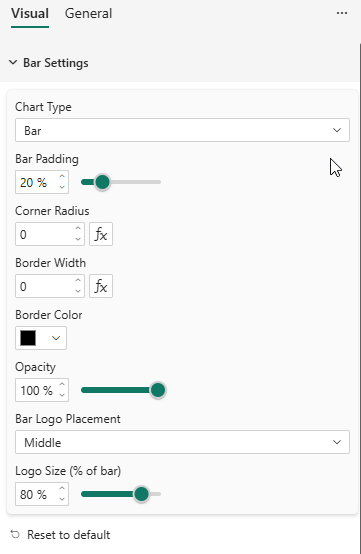
Properties
| Property | Description | Default |
|---|---|---|
| Chart Type | Column, Bar, Stacked Column, Stacked Bar, 100% Stacked Column, 100% Stacked Bar | Column |
| Bar Padding | Space between bars as a percentage (0–80%) | 20% |
| Corner Radius | Rounded corners on bars (px). Supports conditional formatting (fx). | 0 |
| Border Width | Bar border thickness (px). Supports conditional formatting (fx). | 0 |
| Border Color | Color of bar borders | #000000 |
| Opacity | Bar fill opacity (10–100%) | 100% |
| Bar Logo Placement | Where to display series logos inside bars: None, Center, Top, Bottom | None |
| First items | Category labels pinned to the start of the axis, in the order you list them. Supports conditional formatting (fx). | (empty) |
| Last items | Category labels pinned to the end of the axis, in the order you list them. Supports conditional formatting (fx). | (empty) |
Bar Logo Placement
When a Logo is provided in the data, you can display it inside each bar:
- None — No logo in bars
- Center — Logo centered in the bar
- Top — Logo at the top of the bar (right side for horizontal bars)
- Bottom — Logo at the bottom of the bar (left side for horizontal bars)
The logo is clipped to the bar boundaries and respects the Logo Width and Logo Height settings from the Legend card.
First Items / Last Items
Categories such as None, Other or Not specified rarely belong in the middle of a chart sorted by value. First items and Last items pin the categories you name to the start or the end of the axis, and keep every other bar in its natural order.
Type the labels separated by commas:
Aucun, Autre
Both fields accept several labels, and the order you type them is the order they are displayed in:
| Setting | Value | Result |
|---|---|---|
| Last items | Autre, Aucun | …other bars…, Autre, Aucun |
| Last items | Aucun, Autre | …other bars…, Aucun, Autre |
| First items | Ensemble | Ensemble, …other bars… |
Rules
- Order is preserved — items are placed in the order you list them, not alphabetically.
- Everything else is untouched — unlisted categories keep the sort applied to the visual (by measure descending, alphabetical, or the model's own sort order).
- First wins — a label typed in both fields is pinned to the start.
- Matching ignores case and surrounding spaces, but the label must otherwise match the axis label exactly.
- Unknown labels are ignored — a typo or a category filtered out of the current page simply has no effect.
Labels containing a comma
The comma is the separator, so a label that contains one must be wrapped in double quotes:
"Aucun, ne se prononce pas", Autre
To include a double quote inside a quoted label, type it twice: "Il dit ""oui""".
Which end is "first"?
| Chart type | First items | Last items |
|---|---|---|
| Column and Stacked Column (vertical) | Left | Right |
| Bar and Stacked Bar (horizontal) | Top | Bottom |
With a multi-level axis, typing a parent group value pins every bar of that group. Pinning is applied before the grouping, so pinned bars leave their original position and move as a block.
Both fields support the fx button, so the list of labels can come from a measure returning text instead of being typed by hand — useful when the categories to push to the end depend on the report context.